Article · AI customer service
AI chatbot for e-commerce: how AI customer service works
What an AI chatbot for an online store does and cannot do, how it differs from live chat, how to set it up, what it costs and when a person takes over.
In short
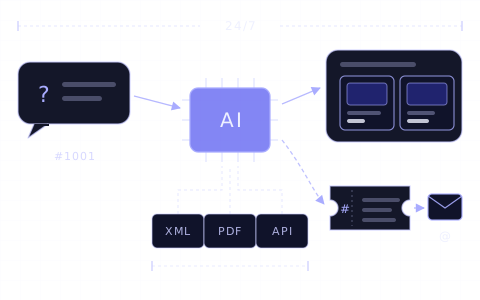
- 01An AI chatbot for e-commerce is an AI agent in the store's chat window. It answers customers from the store's own product catalogue, knowledge base and order data, around the clock.
- 02On Chaterimo, about 42% of conversations started between 18:00 and 8:00 Prague time (February–May 2026), outside business hours.
- 03It handles product advice, delivery, returns and order status. Complaints, refunds, exceptions and questions missing from its data go to a person.
- 04Unlike a rule-based chatbot, it understands questions in the customer's own words; unlike live chat, it needs no operator online. Chaterimo hands over through a ticket and an e-mail and has no live chat.
- 05You pay for the app and for AI usage: a plan with included messages or conversations, a price per AI resolution, or your own API key (BYOK) billed by the model provider.
Contents 12
- What is an AI chatbot for e-commerce?
- What can an AI chatbot do in an online store?
- What can an AI chatbot not do?
- How is an AI chatbot different from a rule-based chatbot and live chat?
- Can you offer real customer service without annoying chatbots?
- When must a person take over?
- How do you set up an AI chatbot for your online store?
- What does an AI chatbot cost?
- How does an AI chatbot reduce customer support costs?
- What does Chaterimo do for online stores?
- Summary
- Frequently asked questions
An AI chatbot for e-commerce is an AI agent in your store's chat window that answers customers from your own product catalogue, knowledge base and order data, around the clock. It recommends products, explains delivery and returns, looks up order status and hands the conversation to a person when it cannot help. That is AI customer service for e-commerce: the AI takes the repeated questions, your team takes the cases that need a person. On Chaterimo, about 42% of conversations started between 18:00 and 8:00 Prague time in February–May 2026, outside business hours (State of AI customer support 2026).
This article explains what such a chatbot can and cannot do, how it differs from rule-based chatbots and live chat, how to set one up, what it costs and when a person must take over. Each part links to a detailed article.
What is an AI chatbot for e-commerce?
A traditional chatbot follows a script. An AI chatbot reads the question in the customer's own words, searches your data for the products and rules that fit, and lets a language model (LLM) write the answer from what it found. When it can also act, for example look up an order or create a ticket for your team, it is called an AI agent.
A general assistant such as ChatGPT does not know your products, stock or rules. The chatbot has to give the model your data with every question; ChatGPT for your website explains how that works and what it means for API keys and privacy.
- AI chatbot
- A chat window on your store in which a language model answers customers' questions.
- AI agent
- An AI chatbot that also uses tools: it searches the product catalogue, looks up an order or creates a ticket.
- Product catalogue
- Your products with names, parameters, variants, prices and stock, imported from the store or from a product feed (XML).
- Knowledge base
- Everything else the chatbot answers from: delivery, payment, returns, warranty, contacts and frequent questions.
- Hand-over to a person
- The moment the chatbot passes the conversation to your team. In Chaterimo it is a ticket with the conversation and an e-mail.
Because the answers come from your catalogue, the chatbot recommends your products, not a competitor's. You change what it knows by changing the data: add a page about a new delivery option, train the chatbot again, and the next answers include it.
What can an AI chatbot do in an online store?
Most questions in an online store repeat. An AI chatbot answers these well when it has the data:
| Customer question | Example | What the chatbot needs |
|---|---|---|
| Product advice | “Which tent for four people weighs under 5 kg?” | Product catalogue with parameters |
| Compatibility | “Does this charger work with a 24 V battery?” | Parameters in the product data or descriptions |
| Stock and price | “Do you have the blue one in size M?” | A catalogue that is updated every day |
| Delivery and payment | “When will it arrive if I order today?” | Delivery rules in the knowledge base |
| Returns and warranty | “How do I return shoes I have worn once?” | Return policy in the knowledge base |
| Order status | “Where is my order 1001?” | An integration with order status lookup |
| A person | “I want to talk to someone.” | Tickets and an e-mail address for your team |
Product advice is where an AI chatbot differs most from a page of frequent questions. The customer describes a need, and the chatbot works as an AI product advisor: it asks what is missing and shows matching products as product cards with a link to the product page. It can also suggest accessories that belong to the product. Describe current discounts and free-shipping offers in the knowledge base, and the chatbot mentions them where they help the customer decide. How to improve its recommendations after the launch is in our guide to fine-tuning an AI product advisor.
The chatbot can also start the conversation. In Chaterimo, the Sales Assistant shows a proactive message on pages you choose, after a delay you set. The message is either your own text or written by the AI, and with a store integration it can take the products in the cart into account. Paid plans include 250 to 1,000 AI-written proactive messages a month, depending on the plan; the 7-day trial includes 100 in total.
Besides the chat window on your store, Chaterimo answers messages sent to your Facebook page through Facebook Messenger. In February–May 2026, 99.6% of conversations on Chaterimo took place in the chat window on the store's website (Chaterimo platform statistics).
The use cases in retail are the same. A shop with physical stores adds opening hours, addresses and pick-up rules to the knowledge base. The chatbot knows the stock of a particular store only if your data contains it.
What can an AI chatbot not do?
- Answer what is not in your data. A language model can state something that is not in your data with full confidence (a hallucination). Keep your data complete, tell the chatbot in its instructions to say when it does not know, and check its answers. In our blind benchmark of AI models, every model scored lowest on accuracy, even with the same knowledge base.
- Act in your store administration. Chaterimo reads the status of an order; it does not change or cancel orders, issue refunds or agree to exceptions to your rules.
- Show an order to anyone who asks. Chaterimo asks for the order number and the e-mail or phone number on the order, and shows nothing when the contact does not match. Order status lookup works with Shopify, Shoptet, Upgates, Eshop-rychle and PrestaShop.
- Decide a dispute. Complaints about damaged goods, warranty claims and angry customers need a person who can look at the case and decide.
- Be newer than its data. Prices and stock are only as current as the last import of your catalogue.
How is an AI chatbot different from a rule-based chatbot and live chat?
| Rule-based chatbot | Live chat | AI chatbot (AI agent) | |
|---|---|---|---|
| Who writes the answer | Scripted flows and buttons prepared in advance | An operator | A language model, from your data |
| Questions in the customer's own words | Only when they match a keyword or button | Yes | Yes |
| Hours | Around the clock | When operators are online | Around the clock |
| Work to set up and run | Writing and updating every flow | Hiring and training operators | Connecting the catalogue and writing the knowledge base |
| Cost grows with | The number of flows to maintain | Operators or seats | The number of conversations (AI usage) |
| Weak spot | Anything outside the script | Nights, weekends and peaks | Questions missing from your data |
Many tools combine an AI agent with live chat or a helpdesk: the AI answers first, and an operator takes over in the same window. Chaterimo is an AI agent without live chat. It hands the conversation over through a ticket and an e-mail, and your team contacts the customer by e-mail or phone. Our article on AI live chat explains when live chat with people, an AI chatbot or both fits a store. If you want your team to answer live in the chat window, see our comparisons of live chat apps for Shopify and Tidio alternatives.
Can you offer real customer service without annoying chatbots?
Yes, and an AI chatbot can be part of it. Customers find automated chatbots annoying when the bot does not understand the question, answers with an unrelated help article, sends them round the same buttons or hides the way to a person. Older chatbots also answered in a stiff tone and with grammar mistakes. Real customer service means a correct answer quickly, and a person when the case needs one.
Five rules keep an AI chatbot on the right side of that line:
- Let it answer only from your data, and keep the data complete.
- Tell customers they are writing with an AI. Do not give it a human name and pretend. Chaterimo's chat window shows "You are communicating with an AI assistant." in the customer's language on every store.
- Always offer a way to a person. When a customer asks for one, the chatbot takes their contact and the conversation goes to your team.
- Answer hand-overs quickly. A ticket answered a week later makes the whole service look automated.
- Read a sample of conversations every week and add what the chatbot did not know.
The time your team saves on repeated questions goes to the cases that need a person. Chaterimo works this way: the AI answers from your data, and a customer who wants a person gets one through a ticket for your team. If you do not want AI at all, the alternative is a team with live chat or a helpdesk and good help pages; it needs people online for every hour you want to cover.
When must a person take over?
A person takes over when the case needs a decision, money or empathy:
- the customer asks for a person;
- goods arrived damaged, wrong or incomplete, or the customer makes a warranty claim;
- the customer wants a refund, a change or cancellation of an order, or an exception to your rules;
- a payment failed or was charged twice;
- the customer is angry or the conversation turns into a dispute;
- a large or business order needs a quote;
- the chatbot did not find the answer, or the customer is not satisfied with it.
In Chaterimo, the hand-over is a ticket. After every new message, Chaterimo checks the conversation. By default it creates a ticket when the customer leaves an e-mail or phone number, for example after asking for a person or saying that the problem is not solved. The ticket holds the conversation, a summary and the contact, and Chaterimo e-mails it to the address in Notification email (leads + tickets) in Account Settings. You can change the conditions in Ticket Analysis Prompt in the same place. Tickets are part of the 7-day trial and of the Evolve plan and higher.
How do you set up an AI chatbot for your online store?
You need no programming. The setup has five steps; the getting-started guide shows each screen in Chaterimo.
- Connect the catalogue. Shopify, Shoptet, Upgates and Eshop-rychle stores connect in Integrations: the integration imports the products, keeps them up to date and installs the chat window. PrestaShop stores connect there for order lookup and the chat window. The catalogue of PrestaShop and of other platforms, for example WooCommerce, comes from a product feed (XML). Platform guides: Shopify, WordPress and WooCommerce, Squarespace.
- Write the knowledge base. Add delivery, payment, returns, warranty and contacts. Import the pages of your website, upload files (PDF, Word, Excel and others) or paste text. Then go through recent customer e-mails and add what customers ask that your website does not say.
- Choose the model and the instructions. Pick GPT, Claude, Gemini or Grok; our guide to choosing an LLM for customer support explains how. In Chatbot role, describe who the chatbot is, its tone and when it offers a person. With Chatbot language set to Automatic, it answers in the customer's language.
- Test before customers see it. Ask 20–30 real customer questions in Test Chatbot. On the Compare Models tab, the same question goes to several models at once. Under a wrong answer, Analyze why AI answered like this shows the likely cause, such as missing data or an instruction to change.
- Go live and watch the first weeks. Put the chat window on your website (the integration does it, otherwise one snippet in the site-wide layout). Then read Chat History and the tickets, and fill in the gaps.
What does an AI chatbot cost?
An AI chatbot costs the app plus the AI usage. Apps bill the AI usage in one of three ways:
| Pricing model | What you pay | Example (checked 20 October 2026) |
|---|---|---|
| Plan with included AI usage | A monthly fee with a limit on AI conversations or messages | Tidio, Chatty and other apps in our Shopify comparison; Chaterimo plans with Chaterimo's API keys |
| Price per AI resolution | A fee for each conversation the AI resolves, on top of a plan or seats | Gorgias: $1.00 per automated interaction with monthly billing1; Intercom: $0.99 per Fin outcome2 |
| Plan plus your own API key (BYOK) | A monthly fee to the app plus the model provider's price per token | Chaterimo plans with your own API key |
Tokens are the units of text that model providers bill by. With your own API key, a busy month costs more with the provider, not with the app, and you can switch the model when a provider releases a new version. On Chaterimo, plans with your own key have no monthly message limit; how to get an OpenAI API key shows the first step. The plans are on the pricing page, and a new account starts with a 7-day free trial.
Count your own time too: preparing the data at the start, reading conversations and answering tickets.
How does an AI chatbot reduce customer support costs?
An AI chatbot lowers support costs of a Shopify store or any other online store in three ways:
- Repeated questions stop reaching your team. Customers ask about delivery, returns, stock and order status every day, and the chatbot answers them from your data.
- Nights and weekends need no shifts. About 42% of conversations on Chaterimo started between 18:00 and 8:00 Prague time (February–May 2026).
- Hand-overs arrive prepared. A ticket comes with the conversation, a summary and the contact, so your team does not ask the same questions again.
Compare it with the other ways to cut support costs. They work best together: help pages also feed the chatbot's knowledge base, and your own or outsourced agents answer the tickets.
| Option | What it covers | What to watch |
|---|---|---|
| Help pages and FAQ | Questions customers look up themselves | Customers must find the page; it does not answer follow-up questions |
| Outsourcing to an agency | Every hour you pay for | External agents learn your products and tone slowly; you train and check them, and their language must fit your customers |
| More people in your team | Every kind of question | The cost grows with each hour you cover |
| AI chatbot | Repeated questions, around the clock | Needs complete data and an easy way to a person |
To see whether it works, measure the same numbers before and after the launch:
- First contact resolution (FCR)
- The share of questions solved in the first conversation, without a follow-up.
- Average handle time (AHT)
- How long your team spends on one question or ticket.
- Customer satisfaction (CSAT)
- How customers rate the answer, for example in a short survey after the conversation.
- Hand-over rate
- The share of conversations that end with a ticket for your team.
What does Chaterimo do for online stores?
Chaterimo is an AI agent for customer support of online stores. It imports the catalogue directly from Shoptet, Upgates, Eshop-rychle and Shopify stores; PrestaShop stores connect for order lookup and the chat window, and the catalogue of other platforms comes from a product feed (XML). It answers customers around the clock in the chat window and on Facebook Messenger, recommends products from the catalogue and hands conversations over to the store's team as a ticket with the conversation and an e-mail. There is no live chat in which a person takes over the chat window.
It works with models from OpenAI, Anthropic, Google and xAI, and a store can use its own API key and pay the provider directly (BYOK). Chaterimo was founded on 1 July 2023 by David Langr in Prague; it is independent and self-funded. Contact: info@chaterimo.com.
Summary
An AI chatbot for e-commerce answers customers from your catalogue, knowledge base and order data around the clock, and passes to a person what needs a decision. It differs from a rule-based chatbot by understanding questions in the customer's own words, and from live chat by needing no operator online. Set it up with complete data, test it on real questions, give customers an easy way to a person and measure what it saves. The getting-started guide takes you through the setup, and our Shopify comparison shows how other AI chatbot apps work.
Frequently asked questions
What is an AI chatbot for e-commerce?
An AI agent in the chat window of an online store that answers customers from the store's product catalogue, knowledge base and order data, recommends products and hands the conversation to a person when it cannot help.
Can an AI chatbot replace customer service staff?
It replaces repeated answers, not people. Complaints, refunds, exceptions and disputes still need a person; the chatbot passes them on as a ticket and covers the hours when nobody is online.
Will the chatbot recommend a competitor's products?
No. It recommends products from your own catalogue and answers from your knowledge base.
Can an AI chatbot tell customers where their order is?
Yes, with a store integration. Chaterimo looks up order status in Shopify, Shoptet, Upgates, Eshop-rychle and PrestaShop and shows it only when the customer gives the e-mail or phone number on the order.
Do I need programming skills to set up an AI chatbot?
No. Store integrations install the chat window for you; on other websites you paste one snippet into the site-wide layout. The getting-started guide shows each step.
How much does an AI chatbot for an online store cost?
The app plus AI usage, billed as included messages, a price per AI resolution or through your own API key. Chaterimo's plans are on the pricing page; a new account starts with a 7-day free trial.
Guide · First AI chatbot
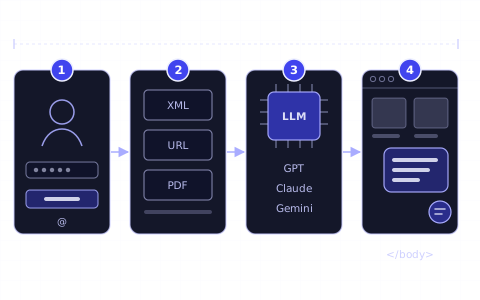
Getting started: your first AI chatbot in 4 steps
Sign up, connect your store or add your content, choose the AI model and put the chat window on your website. The getting-started guide for online stores.
Article · AI live chat
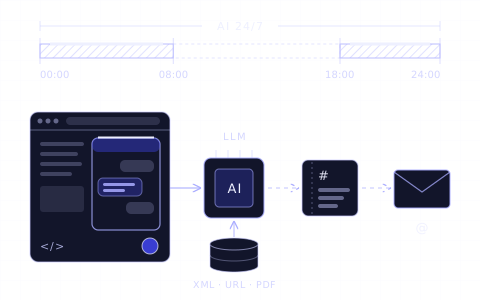
AI live chat on your website: how to set it up
What AI live chat is, when live chat with people, an AI chatbot or both fits your store, and how to set it up: data, chat widget, testing and hand-over.
Guide · AI product advisor
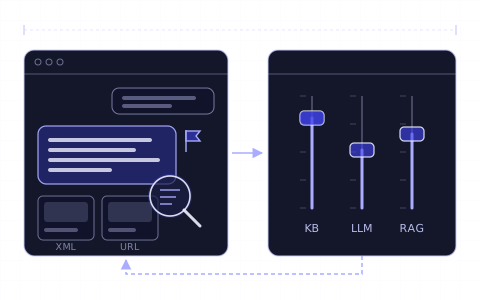
How to fine-tune your AI product advisor
Improve your AI chatbot's answers after setup: knowledge base, instructions, AI model, testing, answer analysis, sales rules and measuring progress.
Changelog
- Rewritten as the main article on AI customer service and moved to the new blog. Merged with “AI customer service for e-commerce and websites”, “How to create a chatbot for e-commerce”, “How to reduce customer support costs on Shopify” and “Chatbots in retail”.
- Published.